- YESExtra attempt, to start over from scratch?
- YESAccess the extra attempt immediately?
- NOAdditional time beyond the time limit?
Your answer
Extra attempt now, no extra time
Action steps
- Click “Moderate This Quiz”.
- Click “Student Extensions” (pencil icon).
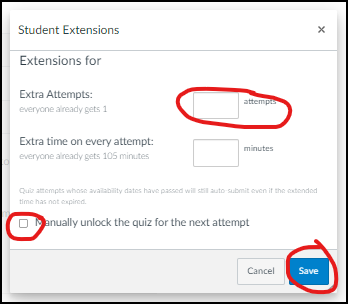
- Add the number of extra attempts.
- Check the box “Manually unlock the quiz for the next attempt”.
- Click “Save”.
The student has immediate access to the quiz. Canvas will flag the submission as late.
Questions about this tool? Email samberg@gsb.columbia.edu.